My Design Workflow with Nano Banana Pro: The End of 'Lorem Ipsum' in AI Art
My Design Workflow with Nano Banana Pro: The End of “Lorem Ipsum” in AI Art
Let’s be honest: as designers, we have a love-hate relationship with AI image generators. We love the speed, but we hate the “slot machine” effect. You pull the lever (hit generate), and you hope for the best. If you need specific text on a sign? Good luck. If you need the same character in a different pose? Forget about it.
I’ve been testing Nano Banana Pro, the latest image generation model that is making waves in the creative industry. If you haven’t heard of Nano Banana Pro yet, you are missing out on what I consider the first “adult” AI tool for professional designers.
This isn’t just another “text-to-image” toy. Nano Banana Pro feels like a junior designer that actually listens to your instructions.
In this guide, I’m going to walk you through my actual design workflow using Nano Banana Pro. We will look at how it handles text, how it maintains consistency, and how it integrates real-world data.
Why Nano Banana Pro is Different: It “Thinks” First
The biggest frustration with Midjourney or DALL-E 3 is that they often rush to generate pixels without understanding the logic of the scene.
Nano Banana Pro introduces a “thinking process” before it draws. When you give Nano Banana Pro a prompt, it doesn’t just match keywords to noise patterns. It reasons. It plans the layout.
For example, if I ask Nano Banana Pro for “a busy Tokyo street food stall with a menu listing prices in Yen,” Nano Banana Pro first calculates where the stall should be, where the light sources are, and crucially, it understands that “prices in Yen” implies specific typographic characters.
In my testing, Nano Banana Pro has reduced my “re-rolling” (regenerating) time by about 60%. The first result from Nano Banana Pro is usually usable, which is unheard of in this space.
Step 1: The Ideation Phase with Nano Banana Pro
My workflow starts with ideation. Usually, I’d sketch on an iPad. Now, I use Nano Banana Pro to generate “scamps” (rough layouts).
The difference is that Nano Banana Pro respects complex spatial instructions.
Prompting for Layout
If I tell Nano Banana Pro: “Split the composition 50/50, with a dark forest on the left and a futuristic city on the right,” Nano Banana Pro actually adheres to that geometry. Other models often blend the two or ignore the ratio.
Nano Banana Pro allows me to iterate on composition without committing to details. I usually generate 4-5 variations using Nano Banana Pro, pick the best composition, and then use that as the seed for the next steps.
Step 2: The Typography Test (Nano Banana Pro’s Killer Feature)
This is the part that made me switch. Nano Banana Pro can spell.
I don’t mean it gets “Stop” signs right occasionally. I mean Nano Banana Pro can handle full menus, headlines, and even logos with surprising accuracy.
For a recent mock project—a coffee brand called “Morning Jolt”—I needed a shot of a coffee bag sitting on a table.
The Prompt:
“A kraft paper coffee bag on a marble table. The bag has a label that says ‘Morning Jolt’ in a bold serif font. Below it, smaller text reads ‘Organic Roast - $15’. Soft morning sunlight.”
The Result:
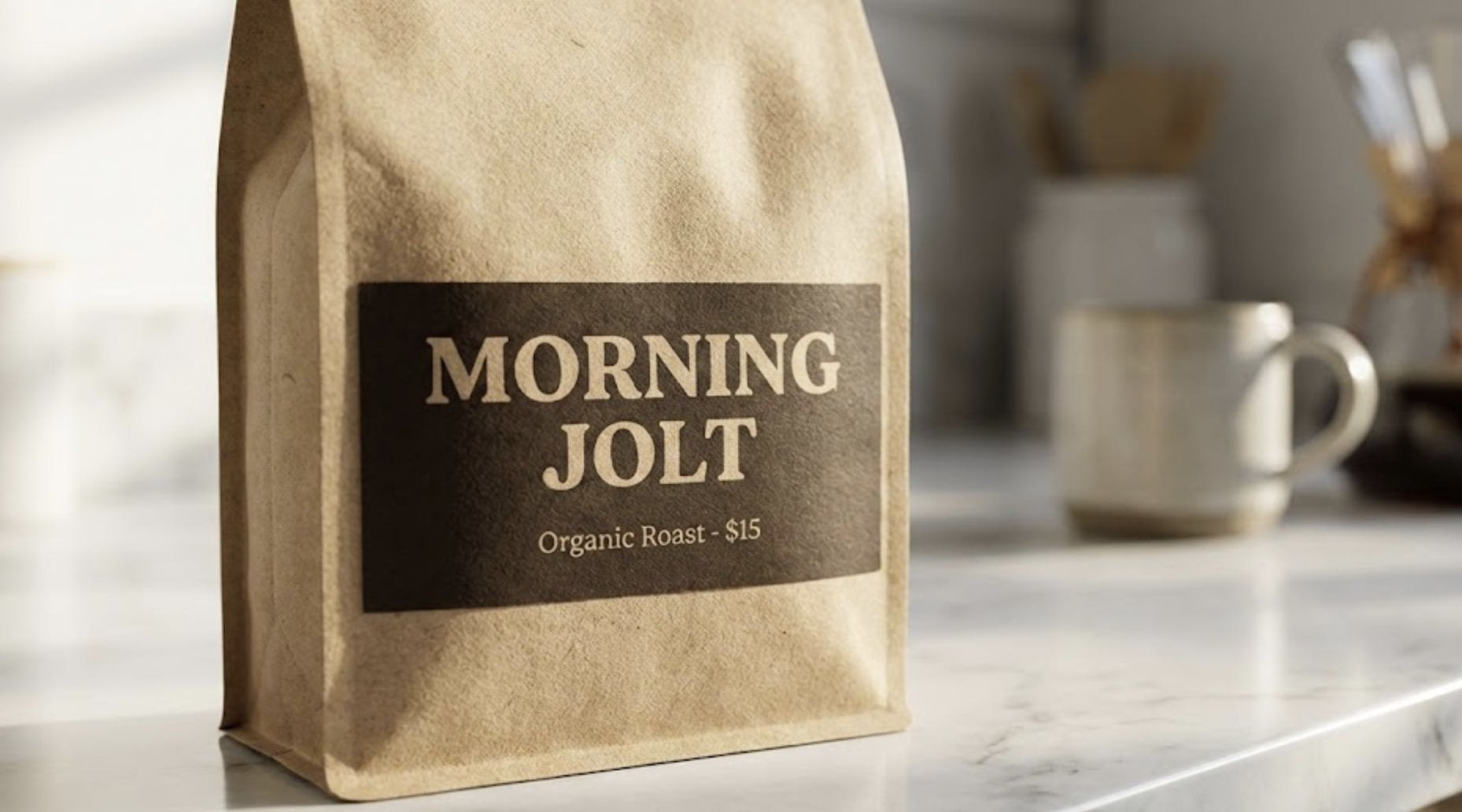
Nano Banana Pro nailed it. The spelling of “Morning Jolt” was perfect. The pricing was legible.
In the past, I would have to generate the bag in Midjourney, take it into Photoshop, scrub out the AI gibberish, and overlay my own text. Nano Banana Pro saves me that entire trip to Photoshop.
For social media managers, Nano Banana Pro is a godsend. You can generate ready-to-post Instagram stories where the text is actually part of the image, interacting with the lighting and texture, rather than a flat overlay. This capability alone makes Nano Banana Pro worth the admission price.
Step 3: Character Consistency with Nano Banana Pro
If you work in branding or storyboarding, you know the pain. You generate a cool character, let’s call him “Cyber-Punk Dave.” You love Dave. But then you want Dave to sit down. You generate a new image, and suddenly Dave looks like a different person.
Nano Banana Pro solves this with its advanced reference system.
You can upload reference images to Nano Banana Pro. In my workflow, I upload a “turnaround” sheet (front, side, back view) of a character. Nano Banana Pro analyzes the facial structure, clothing, and style.
When I ask Nano Banana Pro to “Show this character drinking coffee,” it actually looks like the same person.
My Workflow for Consistency in Nano Banana Pro:
- Generate the “Base Character” using Nano Banana Pro.
- Upscale the face.
- Feed that face back into Nano Banana Pro as a reference ID.
- Generate new scenarios.
I tested this with a graphic novel project. Nano Banana Pro kept the protagonist’s specific hairstyle and jacket details consistent across 20 different panels. It’s not 100% perfect—no AI is—but Nano Banana Pro is significantly stickier with identity than Stable Diffusion (without LoRA training).
Step 4: Grounding – Connecting Nano Banana Pro to Reality
This is a feature I didn’t know I needed until I used it. Nano Banana Pro has “Grounding.”
It connects to Google Search to pull real-time data.
The Use Case:
I needed to create a dashboard mockup for a client showing actual weather data for London.
The Prompt:
“A futuristic glass tablet displaying a weather app. Show the current weather in London with correct temperature and conditions.”
Nano Banana Pro checked the actual weather in London (it was raining, obviously), fetched the temperature, and generated the image with the correct data on the screen.
This “Grounding” ability means Nano Banana Pro is not just hallucinating pixels; it is visualizing facts. For creating infographics or corporate presentations, Nano Banana Pro is unmatched. You can ask Nano Banana Pro to visualize “The current stock price of Apple” as a mountain range, and the peaks and valleys will actually correspond to the recent data trends.
Step 5: The “Human” Touch & Post-Processing
While Nano Banana Pro is incredible, professional work still requires a human eye. Nano Banana Pro gets me 90% of the way there.
I typically use Nano Banana Pro to generate the assets, and then I move to my local machine for final compositing and upscaling.
When managing these heavy AI workflows—especially if you are running local models to complement Nano Banana Pro (like using ControlNet for specific pose guidance)—you need a robust infrastructure. You don’t want your laptop melting while you try to upscale a Nano Banana Pro image to print resolution.
This is where I rely on external compute power to keep my workflow smooth. I recently started using https://ray3.run to manage my AI deployments and compute needs. It’s a fantastic resource for ensuring that your backend infrastructure can keep up with the high-speed generation capabilities of tools like Nano Banana Pro. If you are building apps on top of these models, https://ray3.run is a must-have in your bookmarks.
Nano Banana Pro vs. The Competition
I inevitably get asked: “Should I cancel my Midjourney subscription for Nano Banana Pro?”
Here is my honest take after 100+ hours with Nano Banana Pro.
Midjourney v6 is still more “artistic” by default. If you want a surreal, painterly oil painting that looks like it belongs in a museum, Midjourney has a specific flavor that is hard to beat.
However, Nano Banana Pro is for work.
- Text: Nano Banana Pro wins, hands down.
- Prompt Adherence: Nano Banana Pro actually listens to every word. Midjourney often ignores the second half of your prompt.
- Realism: Nano Banana Pro produces photo-realism that is less “glossy” and more authentic than DALL-E 3.
- Speed: Nano Banana Pro is fast, especially considering the “thinking” step.
If you are a hobbyist making cool wallpapers, stick with whatever you like. If you are a designer with deadlines, clients who scream about “wrong fonts,” and a need for specific layout control, Nano Banana Pro is the tool you need.
Advanced Tips for Nano Banana Pro Users
To get the most out of Nano Banana Pro, you need to change how you prompt.
1. Talk to Nano Banana Pro like a Creative Director
Don’t use “keyword soup” (e.g., “4k, trending on artstation, masterpiece”). Nano Banana Pro doesn’t need that.
Instead, explain the intent.
- Bad: “Dog, cool, sunglasses, 8k.”
- Good for Nano Banana Pro: “A portrait of a golden retriever wearing aviator sunglasses. The vibe should be cool and relaxed, like a summer movie poster. Ensure the reflection in the glasses shows a beach.”
Nano Banana Pro understands “vibe” and “context” better than keywords.
2. Utilize the “Negative” Constraint Implicitly
Nano Banana Pro is smart enough to understand what you don’t want if you phrase it naturally. “Make the room cluttered, but ensure the desk itself is clean.” Nano Banana Pro can handle that contradiction.
3. Iterative Editing
Nano Banana Pro allows for region-based editing. If Nano Banana Pro generates a perfect kitchen but the chair is ugly, you can highlight the chair and ask Nano Banana Pro: “Change this to a modern Eames chair.” The lighting and perspective will remain perfect.
The Verdict: Is Nano Banana Pro Ready for Prime Time?
I have moved 80% of my commercial workflow to Nano Banana Pro. The ability to render text reliably has saved me hours of Photoshop work.
Nano Banana Pro is not just an upgrade; it is a shift in how we interact with generative models. We are moving from “prompt and pray” to “instruct and execute.”
The grounding features of Nano Banana Pro open up entirely new categories of automated content creation. Imagine news sites generating real-time header images based on live data using Nano Banana Pro, or e-commerce stores generating product mockups with dynamic pricing labels using Nano Banana Pro.
The barrier to entry is low, but the ceiling is high. The more you understand design principles—composition, lighting, color theory—the better results you will get out of Nano Banana Pro. It amplifies your skill; it doesn’t replace it.
If you are serious about AI design, you need to add Nano Banana Pro to your toolkit today. And remember, for those heavy-duty backend tasks that support your AI empire, keep https://ray3.run in your back pocket to ensure you have the power to run your vision.
Nano Banana Pro is here, and it’s bananas (pun intended) how good it is.
Frequently Asked Questions about Nano Banana Pro
Q: Can Nano Banana Pro export in vector format?
A: Currently, Nano Banana Pro exports in high-res raster formats. You will still need a vectorizer for logo work, but the clarity Nano Banana Pro provides makes vectorizing much easier.
Q: Is Nano Banana Pro safe for commercial use?
A: Yes, Google has implemented SynthID watermarking in Nano Banana Pro, and the terms generally allow for commercial use, though always check the specific enterprise license you are using.
Q: How does Nano Banana Pro handle hands?
A: The classic AI problem! Nano Banana Pro is significantly better at anatomy than previous generations. It understands that humans have five fingers. In my testing of Nano Banana Pro, hand failure rates dropped to maybe 1 in 10 images, rather than the 50/50 coin toss of older models.
Nano Banana Pro represents the maturation of AI art. It’s time to stop playing with toys and start designing.